
Long description
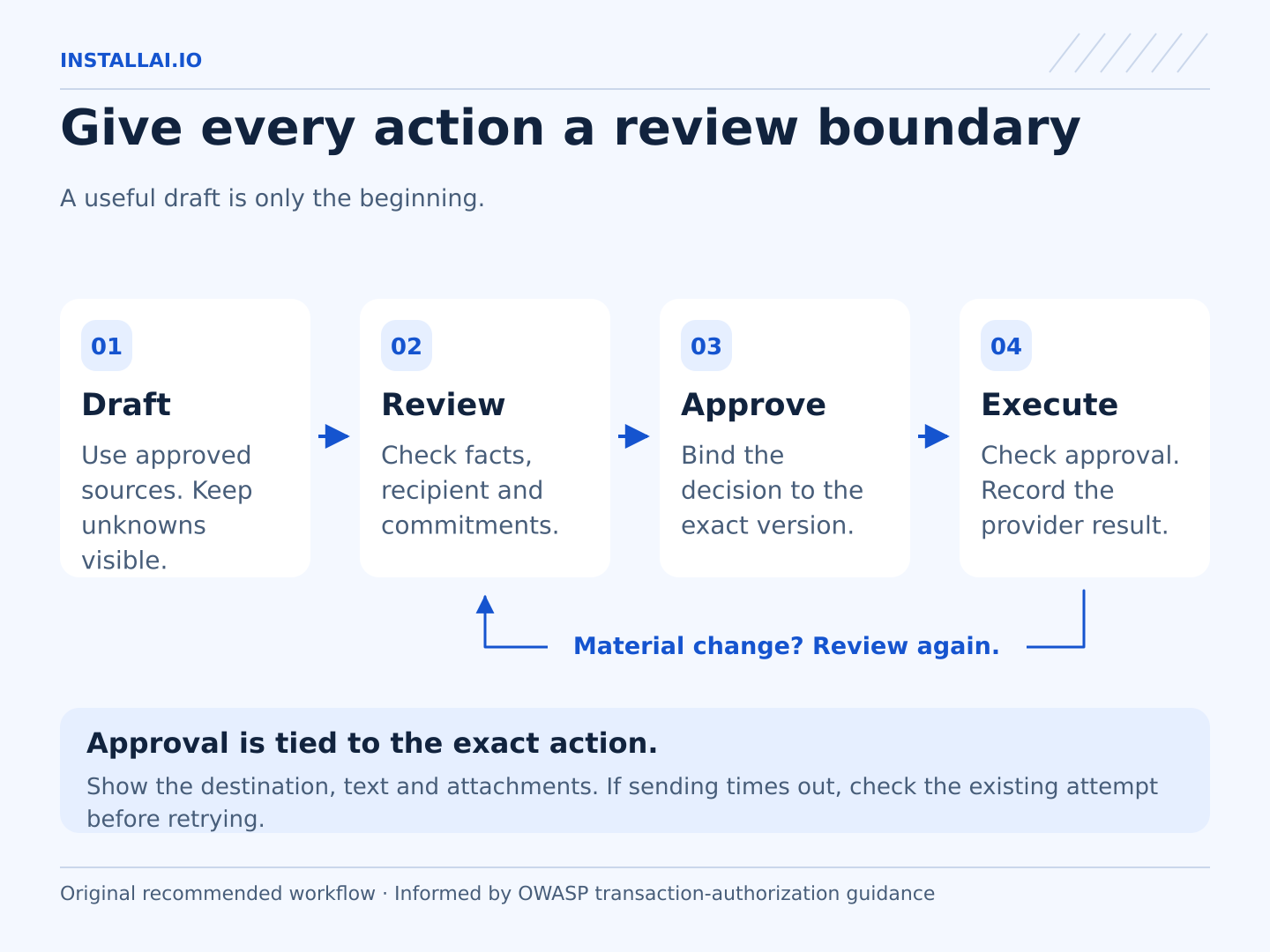
Four steps are connected in order: draft from approved sources; review facts, recipient, and commitments; approve the exact version; then execute only with valid approval and record the provider result. Material changes return to review, and an uncertain send must be investigated before retrying.
The most important email review happens before you judge whether the wording sounds good. Confirm who will receive it, what the message commits you to, and which information they should see. A smooth paragraph can still go to the wrong person or promise something your business has not approved.
This guide helps small teams review AI-assisted email drafts. It works with text prepared in a separate document or drafts created inside an email application. You will finish with a checklist and a clear boundary between preparing a message and authorizing its send. Product details were checked on October 10, 2026.
1. Confirm the purpose and conversation
Write the draft's purpose in one line: answer a question, request missing information, acknowledge a document, or propose a time. Compare the actual message with that purpose. Remove unrelated sales language or new requests that the sender did not intend to add.
Read enough of the thread to understand the latest state. An earlier proposed date may have been replaced. A quoted message may be weeks old. Gmail's API documentation describes retrieving conversation messages in order, which can support this context check when a connection is configured for it. Gmail thread documentation.
Keep a source reference with the draft during review. If the assistant used an attachment, make sure the reviewer can see which file and version it read. If it could not open the attachment, the draft must not pretend to have reviewed it.
2. Verify every recipient
Review the actual addresses in To, Cc, and Bcc, not just the names in the greeting. Two contacts can share a first name. A familiar display name does not establish that a new address belongs to the same person.
For a reply, check whether the response belongs to the sender alone or the full group. A new recipient changes who receives the conversation, including any quoted history. Confirm that this wider audience is intentional before using reply-all or adding someone.
Check the sending account and signature too. A message prepared in a personal account may need to come from the business account. The draft should not imply authority from a department or title that the sender does not hold.
3. Check facts and commitments separately
First verify names, dates, amounts, product names, reference numbers, and attachment descriptions against the source. Then highlight each sentence that makes a promise or decision. Examples include agreeing to a price, accepting a deadline, approving a refund, or saying work has been completed.
For each commitment, ask who authorized it and what limits apply. “We will deliver Tuesday” requires more than a customer asking for Tuesday. “I have attached the report” requires the right report to be attached. A future intention should not become a completed action merely because the wording is more concise.
Leave unresolved details visible to the reviewer. Do not send a draft with bracketed placeholders or quietly replace missing facts with guesses. If the purpose is to ask for clarification, make that question direct and easy to answer.
4. Inspect what the message reveals
Review the full outgoing package: body, quoted thread, attachments, links, and any copied notes. A short reply can disclose confidential details through a forwarded chain or a document whose audience is too broad.
Use the minimum information needed for the conversation. A customer usually needs a revised appointment option rather than a colleague's private circumstances. Check shared-file access using the recipient's intended level of permission. Do not make a file public just to solve an access problem.
Apply your normal approval process to sensitive or consequential messages. Employment decisions, disputes, medical details, and payment commitments deserve the appropriate human review even when the draft itself took only seconds to prepare.
5. Keep sending under a separate control
Confirm what the email connection can do. Google's Gmail scopes documentation says its compose permission can manage drafts and send emails. A workflow called “draft-only” needs an application-level boundary or a separate manual sending step if that permission is present. Gmail permission scopes.
Ask the implementer to demonstrate where the process stops and how approval applies to the final version. If recipients, attachments, or a material promise change after review, review the changed package again. Do not treat approval of a subject line as approval of everything later added to the email.
Fictional example
Juniper Demo Print is a fictional print shop. An invented customer asks whether an order can arrive Friday. The draft says, “Confirmed for Friday,” and copies a contact with the same first name as the project manager. The reviewer finds that delivery remains unconfirmed and the copied address belongs to another company.
The draft is revised to request the delivery details needed for an estimate, and the unintended recipient is removed. No message is sent in this example. It demonstrates review questions, not a measured result or a real incident.
Final review checklist
- The purpose matches the requested communication.
- The thread and source documents are current.
- To, Cc, Bcc, sender account, and signature are correct.
- Facts match their sources.
- Every promise has the required authorization.
- Attachments, quoted history, and links fit the audience.
- Tone is clear and appropriate for this relationship.
- The final package has been deliberately approved for sending.
Bring a redacted draft and the corrections you commonly make to InstallAI when exploring an email workflow. That gives the setup a practical target: preparing reviewable messages while preserving the decisions that belong to you.
Sources checked
- Google Gmail API thread documentation Checked 2026-10-10
- Google Gmail API authorization scopes Checked 2026-10-10